


How To Install Leviton 6260M Electronic Timer Switch

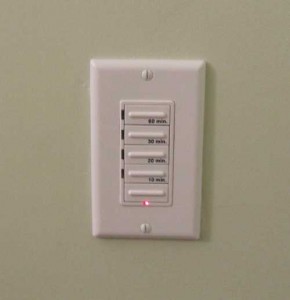
Leviton 6260M Timer Switch
In a previous post, Leviton 6260M Electronic Timer Switch, I wrote about these new timer switches that I purchased to use in our three bathrooms. Using timer switches will allow us to run the fans after we’ve left the room in order to make sure all the excess moisture is removed from the room. This is a great way to make sure enough fresh air is introduced to tight homes and also to make sure we’re getting all that excess moisture out so we won’t have mold and mildew problems.
Tonight I installed the first Leviton 6260M Electronic Timer Switch. You can buy these dimmers from Amazon, Leviton Decora 60-30-20-10 Preset Minute Electronic Timer. The specifications for these timers require that you have a ground and a neutral at the switch location. This is an important detail that you should investigate before you buy these switches. If you just have a switch leg in the box, i.e. the hot leg only which would be two blacks or a black and a white that’s marked, then this timer will not work properly.
 Always remember to shut off the breaker and power to any circuit you’re going to be working on. Even after you shut off the breaker make sure you use a volt meter to test the circuit to make sure it’s not energized. As always, consult an electrician if you’re not positive of what you’re doing. Electricity even in small voltages and amps can severely injure or even kill you.
I followed the instructions for installing this switch. As you can see in the photo you’ll need to connect the green wire to the ground, connect all of the neutrals to the white wire, connect the blue wire to the “hot” lead on the fixture and finally connect the black wire to the black or hot feed from the circuit.
It worked like a charm. The only issue I see is for people that have shallow junction boxes, this switch is very large, that combined with all the wire nuts and you’ll be lucky if you can install it at all with a shallow box. The best thing is I don’t have to worry about anyone leaving the fans running after they leave the room. Now they just select from 10 mins, 20 mins, 30 mins or 60 mins and the timer will shut down the power after that amount of time. This switch should help us save energy and keep the good air quality in our home.










Interesting. I never thought of using a timer switch on a bathroom fan, but I can see the advantages to this. Thanks.
Interesting application! What other cool things could you do with timers?
I notice you do not mention aluminum wiring. This can be a serious problem.
I do not mention aluminum wiring. My post was strictly for copper.
FYI: Leviton also makes a 2-wire timer for about $20. But it’s not comparable to the 3-wire (plus ground) version described above. The 2-wire version actually reduces the voltage, thereby making it innapropriate for use with fans.
Hello,
I just installed this timer switch, only to realize that it does not have the ability to be turned on permanently. This is rather inconvenient as one normally takes showers longer than 15 minutes (which is the max on this timer).
Additionally, I have an on/off switch for some pot lights I installed in the shower. Is there a way to wire the switches so that when the pot lights are on the Fan stays on, and when they are off you still have the option to use the timer switch?
If you have already covered this topic please send me the link.
Thank you in advance,
Robert
@ Robert – I believe you bought a different timer. The timer referenced in this article has, 10 min, 20 min, 30 min and 60 min buttons. I do not think your other scenario is possible.
These Leviton timer switch should have a Timer Override feature.
To override the Timer countdown press and hold the top button for several
seconds. The locator LED will turn amber to indicate the EXTENDED ON
state. In this state the timer will automatically turn OFF after 24 hours. To exit the EXTENDED ON state press any of the timer buttons or the OFF switch.
So if the 15 minutes isn’t long enough for you, this may work. Otherwise, you may want to consider replacing it with a “5-10-15-30” or “10-20-30-60” Leviton Timer Switch.
How do you wire two timer switches to the same inline bath fan. The fan is mounted in the attic and will exhaust both bathrooms. I bought the same exact timers (levitron decora) for each bathroom. I was thinking it would be similar to a 3 way switch? I am thrown a bit by the additional blue wire.
@ Todd – I’m not sure you can wire these in a 3-way configuration. Check out the wiring diagram:
http://www.smarthome.com/manuals/4253.pdf
I think they change the timer settings now and then…some say there’s a 60 min option, others say theirs only goes up to 15. Mine has 5, 10, 15 and 30 mins. I bought mine in Canada at Home Depot and there’s no blue wire! There’s only a red and it has to attach to the lone black wire for the fan. White with the white bunch and black with the black bunch, then hook the green into the ground screw at the back of the box. Worked after some internet research and an incident with my breaker tripping because of a live wire that must have touched something while I still had it set up the wrong way. Anyway now works great.
Jeff – There are several versions available including both the 30 min and 60 min. Thanks for sharing.
I am trying to install a Pass & Seymour RT1LACCV4 7 button timer in place of a bathroom fan switch and am having trouble. The timer switch came with a white, red, black and ground wire. I removed the old wall switch and matched up the white, the black and the ground. The old switch did not have a red wire but there was a capped red wire in the wall, so i connected to that. The switch lit up when selecting any of the times, but the fan did not go on. I disconnected the red and the same thing happened.
This fan also has a light with two switches on the opposite wall (dim and full).
Any thoughts on why the fan doesn’t come on?
Barb – Did the previous switch only control the fan? Did it control any of the light features?
Todd –
Yes, the previous switch only controlled the fan. there are two separate switches on another wall that operate the lite (low and high).
I appreciate your input.
Barb – It sounds like your previous switch was wired as truly just a switch leg. That means that you white wire in the box was actually being used as the HOT leg that sends load to the fan.
These electronic timers need a neutral (white) to work.
Did the timer include directions on what to do if there’s no neutral? If not you may want to read this: http://www.fixya.com/support/t7020531-purchased_legrand_rt1
It includes a recommendation about wiring the timer white to the ground if you have that situation (I’m not an electrician so I’m not sure this is appropriate).
Your red wire is doing nothing and should not be connected at all.
I’ll check the directions again and look into your suggestion.
Thanks,
Barb.
Todd – after further research I found info that says to not connect the neutral and the ground. So I will return this timer and look for one that does not require a neutral connetion. Thanks for your help.
Barb.
“The neutral wire on a circuit carries current. Under normal operation, the ground wire carries no current. If you connect the neutral wire for the timer switch to the ground wire of the circuit, then you are flowing the current required by the timer through the ground wire. That means that anything connected to the ground wire could be subjected to current.
For example, if you plug in a computer on the same circuit. The metal case of the computer could provide a path for current through someone’s body if they touched the computer and some other grounded source.
You risk energizing all of the metallic surfaces in your home; this is especially true if you ever have a loose neutral connection on the circuit in question (happens more often than you think). This puts electricity on your plumbing and appliance frames. Possible shocks in the shower, shocks from the washing machine, etc; it’s very unsafe to leave this switch with neutral connected to ground.
They do make timer switches that do not require a neutral wire. Return this one to the store, and buy the correct switch.
Barb – You can do that but you won’t find an electronic timer. Electronic timers require the neutral as they are an electronic device. The ones that don’t need a neutral usually are spring loaded dials or some type of mechanical timer.
Good luck.
todd – i found the lutron MA-T51 that doesn’t require a neutral. I will research it before I purchase.
thanks for your help,
barb.
I purchased a heater/vent combination unit for the bath and I’d like to use my original timer (so I don’t have to buy a second one) in combination with a switch to run either the heater or vent. I thought a center off switch combined with the timer would be ideal, but center off switches are ridiculously expensive. I currently have one dedicated cable running from the breaker to the switch box for the heater/vent. Any suggestions other than buying a second timer?
Russell – I’m not electrician but it sure sounds to me as though you need two circuits if a heater unit is involved. Is this one of those heater bulb / exhaust units? What are the spec’s on it?
Thanks for the reply! Combined amps is 12.2. I’ve got a cable from a dedicated 20amp breaker to the heater/vent unit…but it’s not connected yet. The heater is a stainless steel element, not a bulb. Heating element is 1400 watts, fan is 25 watts.
Since I can’t find a double pole, double throw, center off switch for under $70, I’m just going to get two timer switches (I’ve found a timer rated at 1800 watts for the heater).
So, like you said, now I’m wondering if I need the fan and heater on two different circuits? The instructions that came with the unit don’t specify. Since the combined amps is 12.2, seems like having them operate off the same cable should be fine.
WhisperWarm
The installations directions sure are weak! I’m just not qualified to make a judgement on this one. I have a feeling there’s probably some relief in the code that allows you to run them off the same circuit but I can’t be sure.
Is this the main light source for the room or is it in addition to another source? If it’s additional you might want to put them on the same timer? Good luck.
I just installed the Levitron Decora for a bathroom vent fan and the fan now runs slower than it did with a conventional switch. What gives?
Are you sure you have the properly rated switch for the load and the fan?
Yes I’m sure. 1800W, the fan is only 1200W…
I’m at a loss. I do know that fan motors can be quite sensitive to voltage. Did you test the voltage before the timer and after?
Can these switches be used if you have aluminum wiring in the house and if not, is there a similar option that will work? We are remodeling the master bath and I would like a timer on the fan.
Really not sure. That’s a question best left to the folks at Leviton. Have you called their tech support center?
To the question about using two of the Leviton timers on one fan, this may be possible, although I haven’t tested yet. This does work with some other switches.
Connect blue wires from both switches to hot wire on fan
Connect black wires from both switches to black line (120V)
Connect white wires from both swtiches to white on fan and incoming line (neutral)
Connect green wires from both switches to incoming line ground and fan ground
If this works as I suspect it will, the fan will run based on the switch that was turned on last. If switch A was turned on for 30 minutes and 10 minutes later switch B was turned on for 30 minutes, the fan will run for a total of 40 minutes.
Hi, i want to install a fan with a timer switch but the step i want to do it is from the power to the fan going to the timer switch i know you can do this for lights but what about fans? and my wire is a 14/2 wire
Chris – Not sure I know what your question is.